
Every bill, every goal, every debt. One month you can actually see.
Most budgets die in the admin: re-typing the same bills, re-linking the same cells, re-checking whether the month balances. Darzen Budget takes one entry and moves eight screens with it.
- The App, Google Sheets and Excel in one purchase
- Eight screens that feed each other from one entry
- Works offline, on two devices, with nothing uploaded
- Pay once and keep it. No subscription, ever
Login emailed right after checkout · One-time payment · Free updates
The real app with a sample household. Your copy starts empty.
Works on the devices you already use
- The AppAny modern browser, works offline
- Google SheetsFree Google account
- ExcelExcel 2016 or newer
- Two devicesYour laptop and your phone
Eight screens. Watch them change hands.
These are the real screens, cycling. Tap any one to hold it.


What's inside
Real screens. No mock-ups.
Every picture is the actual product with a sample household. Tap any screen to see it full size.
Why it works
A budget that is still true on the 28th.
-
Three editions, one price
Use the App on your laptop and phone, keep the Excel workbook, or work in Google Sheets. Same budget, whichever you open.
-
One entry, eight screens
Record a transaction once and the overview, the budget, the bills, the debt date and every goal move with it. Nothing to copy across.
-
Nothing to wire up
No formulas to write, no ranges to fix, no broken references after you insert a row. Open it and type.
-
Built for the awkward months
Three-paycheck months, a bill that lands early, a goal that slipped. The app flags them while the month can still be fixed.
-
Your numbers stay yours
The App runs in your browser and works with the network off. No account, no sync, nothing uploaded to us.
-
Yours for good
Pay once and keep the files. Use the same budget next year and the year after. Updates are free.
Everything in Darzen Budget
One file. Eight screens that feed each other.
-
The App1
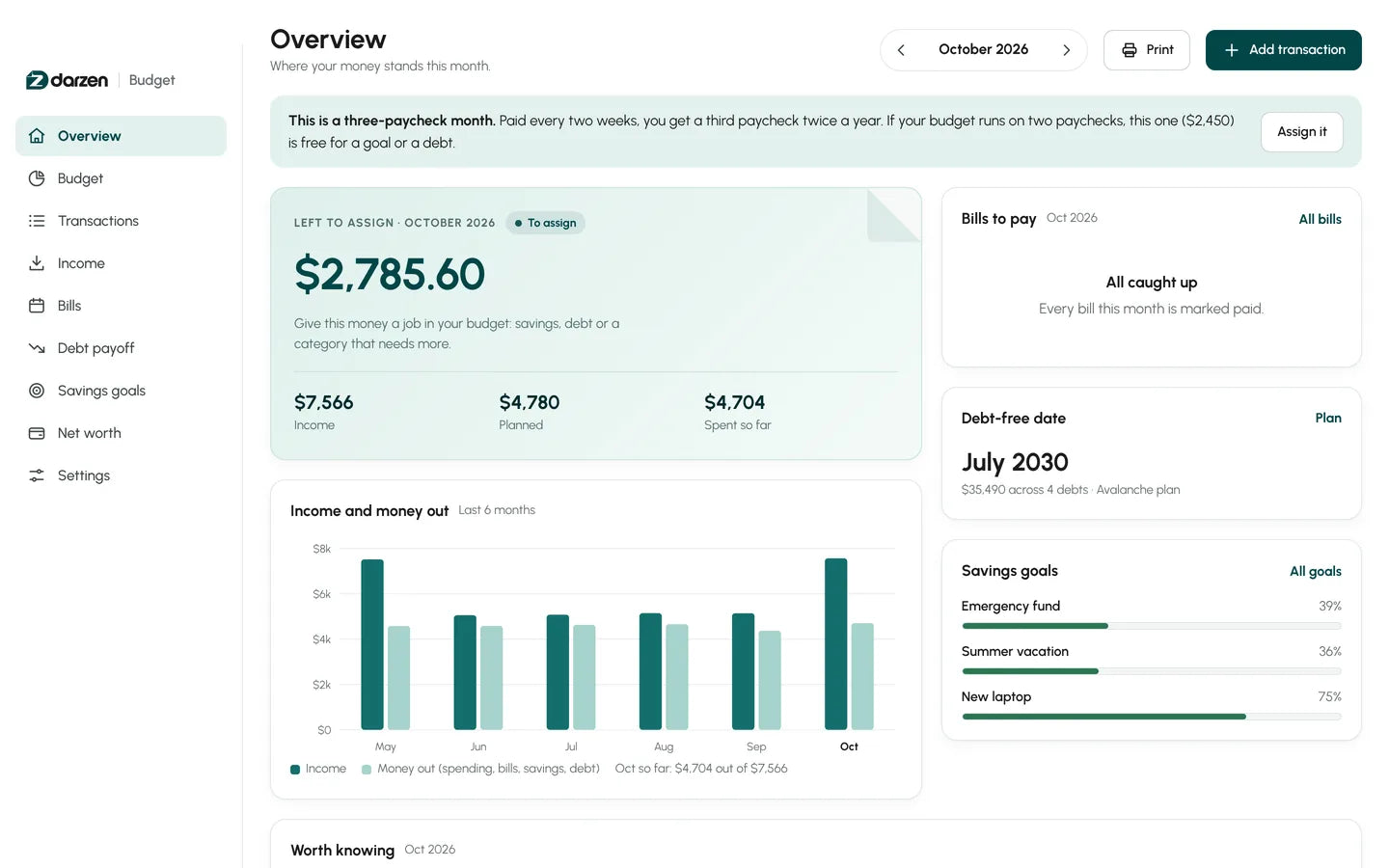
Overview: whether the month works
Left to assign is the one number the month turns on, with income, planned and spent beside it. Underneath: six months of income against money out, the bills still to pay, your debt-free date and every goal, all drawn from entries you made once.
- Left to assign
- Six months, side by side
- Bills at a glance
- Worth-knowing insights
-
The App2
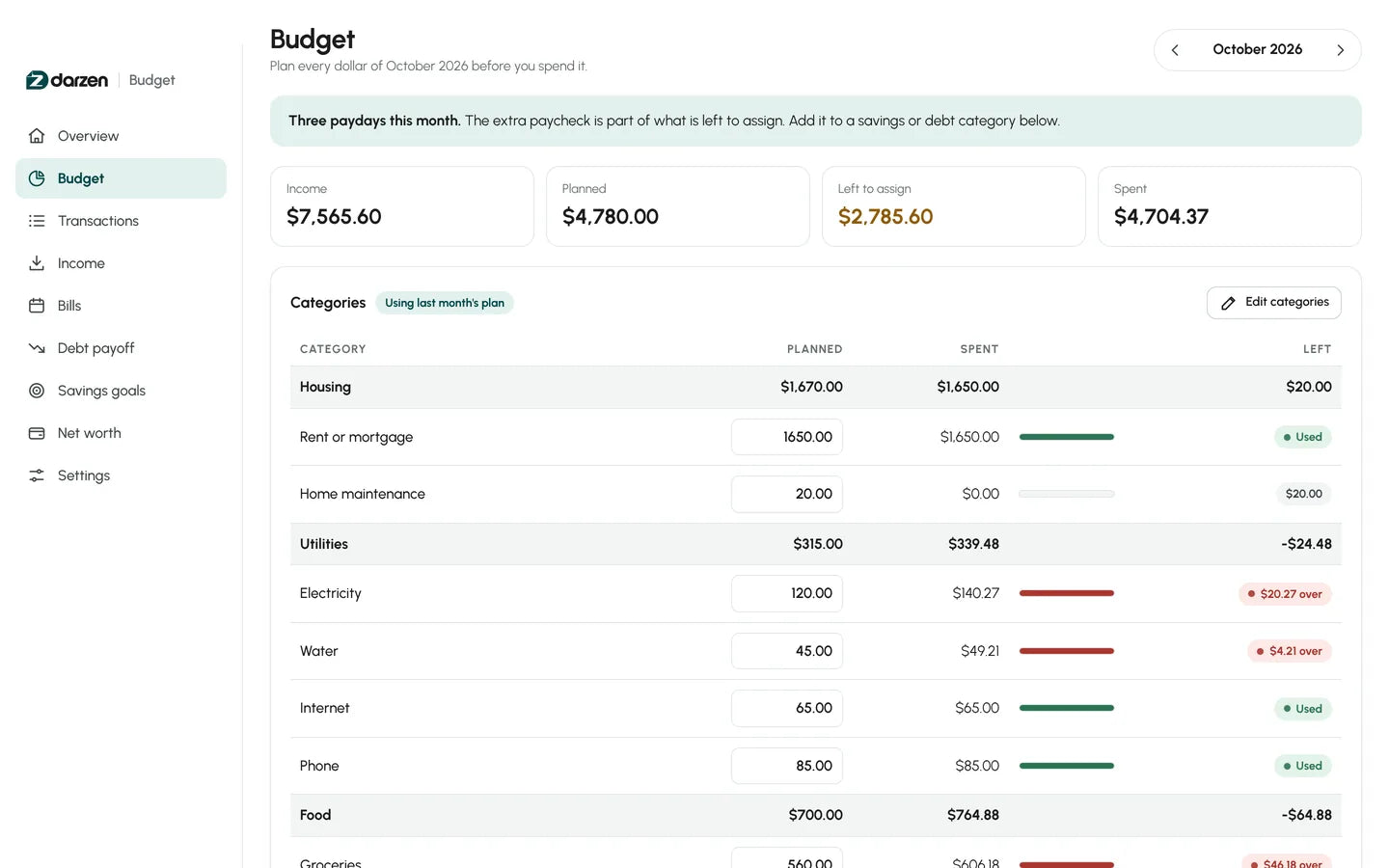
Budget: planned against spent, line by line
Every category shows what you planned, what you have spent and what is left, grouped the way you think — housing, utilities, food, transport. Anything past the plan is marked while the month can still be fixed, and you can carry last month forward instead of retyping it.
- Over and under, marked
- Editable groups
- Carry last month forward
- 50+ rows per group
-
The App3
Transactions: one list, searchable
Every entry for the month in one place, searched by note, category or account, and switched between a single month and the whole year. Autopay entries are labelled so you know what you never have to think about, and the whole list exports to CSV.
- Search by note or account
- Month or whole year
- Autopay marked
- Export to CSV
-
The App4
Income: including the months with three paydays
Expected this month, received so far, how many paychecks are coming and the take-home on each. When a month carries a third paycheck the app says so up front, so you can give it a job instead of letting it disappear. Freelance and one-off income sit alongside.
- Expected against received
- Pay schedule
- Third-paycheck months flagged
- Other income
-
The App5
Bills: due dates on a calendar, not in your head
Each bill with its due date and whether it is paid, due or overdue, beside a month view that colour-codes all three. Ticking a bill paid writes it into your transactions. There is a calendar file to import, so the reminders land where you already look.
- Paid, to pay, overdue
- Autopay counted
- Ticking paid posts it
- Apple, Outlook and Google
-
The App6
Debt payoff: a date you can defend
Choose avalanche or snowball, add whatever extra you can afford, and the debt-free date moves with it — calculated from your own balances and rates, not estimated. It shows the interest you will pay and what the plan saves against paying minimums only.
- Avalanche or snowball
- Interest you will pay
- Saved against minimums
- Up to 40 debts
-
The App7
Savings goals: what each one needs each month
Not a bar filling up. Each goal carries its target, its date, what is still to save and the monthly figure that gets you there on time — and a total for what all your goals ask of you each month, so you can see whether the plan is honest.
- Needed each month
- Still to save
- A date per goal
- Add money in place
-
The App8
Net worth: the long view
What you own against what you owe, recorded each month on its own so a real history builds as you go rather than a projection. The debts you entered on the payoff screen are already counted, and one figure tells you the direction since last month.
- Own against owe
- Months of history
- Change since last month
- Debts carried across
Try it first
Click around. Then decide.
Open the real app with a sample household and try everything. Nothing you type is saved.
Things to try
- Give the left-to-assign money a job in a category
- Raise the extra debt payment and watch the date move
- Tick a bill as paid and find it in Transactions
- Change a goal date and see the monthly figure change


Google Sheets and Excel share the same tabs and formulas. Shown with the example household; your copy starts blank.
How it works
From checkout to your first budgeted month in minutes.
-
Check out securely
Pay on Shopify's secure checkout. You see the total before you pay, and there is no subscription.
-
Get your login
Your Darzen username and password arrive by email right after payment.
-
Open the example first
Sign in and open the copy filled with a sample household, so you can see it working before you touch it.
-
Clear it and put your month in
Switch to the blank copy, add your income and bills, and the rest of the screens fill themselves.
One price
Everything on this page. One payment.
No subscription and no upsells. Updates are free for every buyer.
- The Darzen Budget App, works offline on two devices
- Google Sheets edition, your own copy in Drive
- Excel workbook, filled with a sample household
- Excel workbook, blank and ready for your numbers
- Eight screens: overview, budget, transactions, income, bills, debt payoff, goals, net worth
- Free updates, emailed as they are released
Secure checkout by Shopify. Your Darzen login is emailed right after payment. Refund policy
Not sure yet? Try the live demo first
A few good answers
Questions, answered.
Delivery, devices, updates and your data. Still curious? We reply to every email.
Ask us a questionHow do I get my files?
Right after checkout we email you a Darzen username and password. Sign in to your Darzen account to download the App and the Excel files, and to make your own copy of the Google Sheets edition.
Which edition should I use?
All three come with every purchase, so you do not have to choose. The App feels like software and works offline, Google Sheets lives in your Google account, and Excel is a file you keep.
Which version of Excel do I need?
Excel 2010 or later on Windows and Mac, or Excel for the web. The workbook has no macros.
Does the App need the internet?
Only once, to sign in with the login we email you. After that it opens from the file on your device and works offline.
Where is my data kept?
In the browser on your own device, never on our servers. It never connects to your bank or cards: you type the numbers from your statements. Save a backup file in one click and restore it on any device or browser.
Is this financial advice?
No. It is a planning tool. The debt-free month and the interest figures are estimates worked out from the balances, rates and payments you enter, assuming you pay the same amount every month. Your lender's statement is the final word.
Avalanche or Snowball: which should I pick?
Avalanche pays the highest rate first and usually costs the least interest. Snowball pays the smallest balance first, so your first debts are gone sooner. You can also set your own order. Compare plans shows the debt-free month and interest for each with your own numbers.
Does it work on my phone?
The App works in your phone's browser and the Google Sheets edition works in the Sheets app. Sign in on up to two devices.
How do updates work?
Updates are free. When a new version is ready, it appears in your Darzen account and the App tells you.
Can I get a refund?
See our refund policy, linked next to the price. Try the live demo first so you know exactly what you are getting.
One app. One Google Sheet. One Excel workbook.


