
Move one task. Watch the plan move.
Darzen Timeline is a Gantt planner that really schedules. Link tasks finish-to-start, give them durations in working days, and the dates, the total float and the critical path work themselves out. Change a duration and everything downstream shifts with it.
- Finish-to-start links with lag, so the plan reflows on its own
- Total float and the critical path from a real forward and backward pass
- A working calendar: your working week and your days off
- The App, Google Sheets and Excel in one purchase
Login emailed right after checkout · One-time payment · Free updates
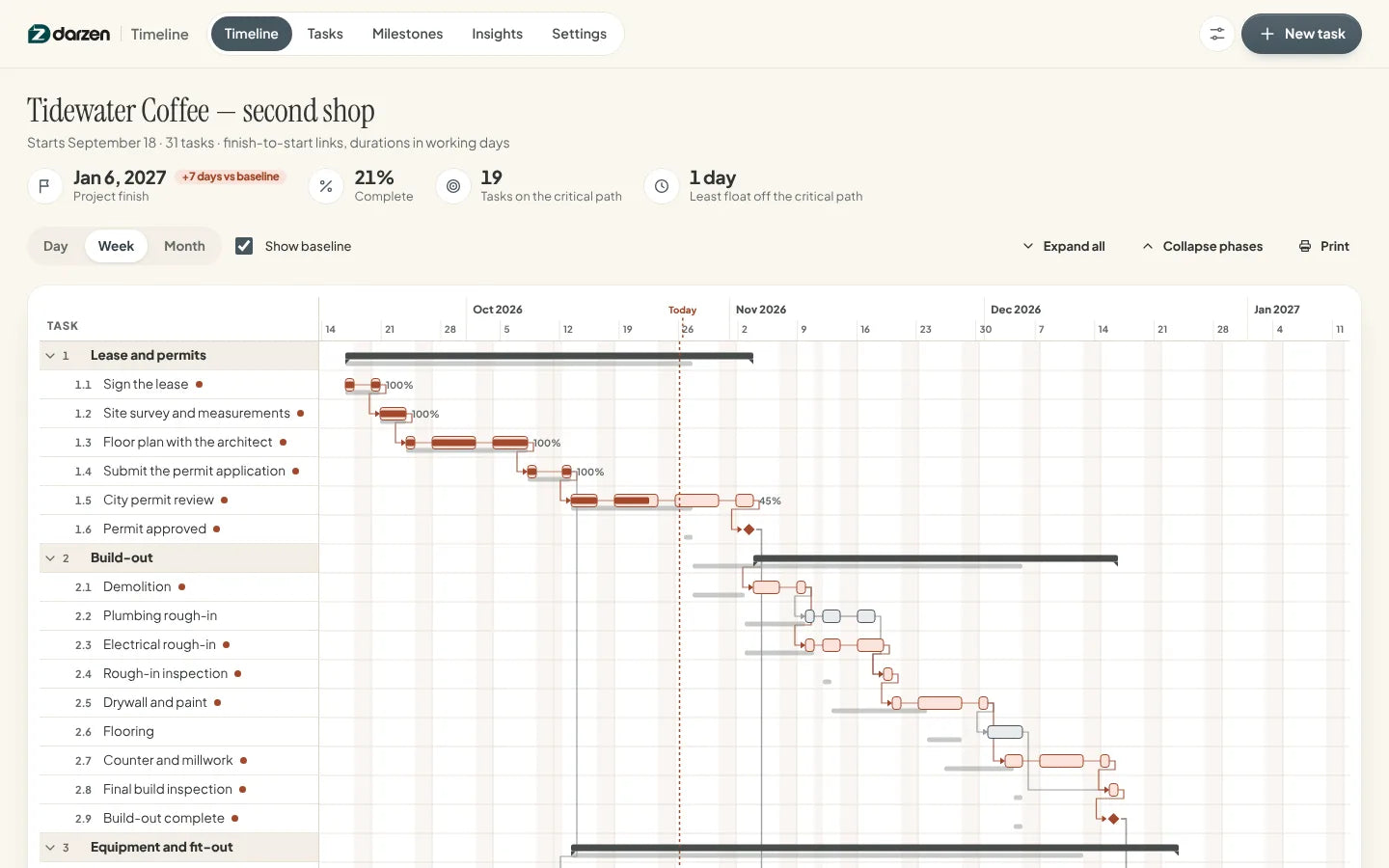
The real app with a sample shop fit-out. Your copy starts empty.
Works on the devices you already use
- The AppAny modern browser, works offline
- Google SheetsFree Google account
- Excel2010 or later, Windows and Mac
- Phone and tabletThe App and Sheets on the go
Every screen. Watch them change hands.
These are the real screens, cycling. Tap any one to hold it.


What's inside
Real screens. No mock-ups.
Every picture is the actual product with a sample project. Tap any screen to see it full size.
Why it works
A planner that does the arithmetic.
-
It reflows on its own
Tasks are linked finish-to-start, with a lag in working days for waiting time like a delivery. Add two days to a task and every task after it moves two days, along with the finish date.
-
The critical path, not a guess
A forward and a backward pass over the whole network gives every task its total float. Zero float means critical, so you know which slips cost you the finish date and which ones do not.
-
A calendar that matches your week
Set the days you actually work and list your holidays and shutdowns. Durations and lags are counted in working days, and bars step over the days nobody works.
-
A baseline to measure against
Save the plan once it is agreed. From then on you see the baseline under each bar, the days early or late on every task, and how far the finish date has moved.
-
Three editions, one price
Use the App on your laptop and phone, keep the Google Sheet in your Drive, or open the Excel file. The spreadsheet editions run the same scheduling, float and critical path.
-
Your plan stays private
The App keeps everything in your own browser, never on our servers. Back it up in one click and restore it on any device.
Everything in Darzen Timeline
One plan. Every view of it.
-
The App1
Timeline: the Gantt
Phases, task bars, milestone diamonds and the arrows between them. Baseline bars sit under the current ones, non-working days are shaded, and a today line runs down the chart.
- Day, week and month zoom
- Dependency arrows
- Baseline under every bar
- Critical path in color
-
The App2
Tasks: the numbers behind the bars
One row per task with its predecessors, duration in working days, start, finish, total float and how many days it sits from the baseline. Filter to the critical path or to anything running late.
- Total float per task
- Days vs baseline
- Search and filters
- Export to CSV
-
The App3
Milestones: the dates people ask about
Every milestone with its date, its float and whether it has moved from the baseline, plus the phases underneath and the critical path beside them. Send them all to your calendar in one file.
- Calendar file
- Float on every date
- Phase rollup
- Mark reached
-
The App4
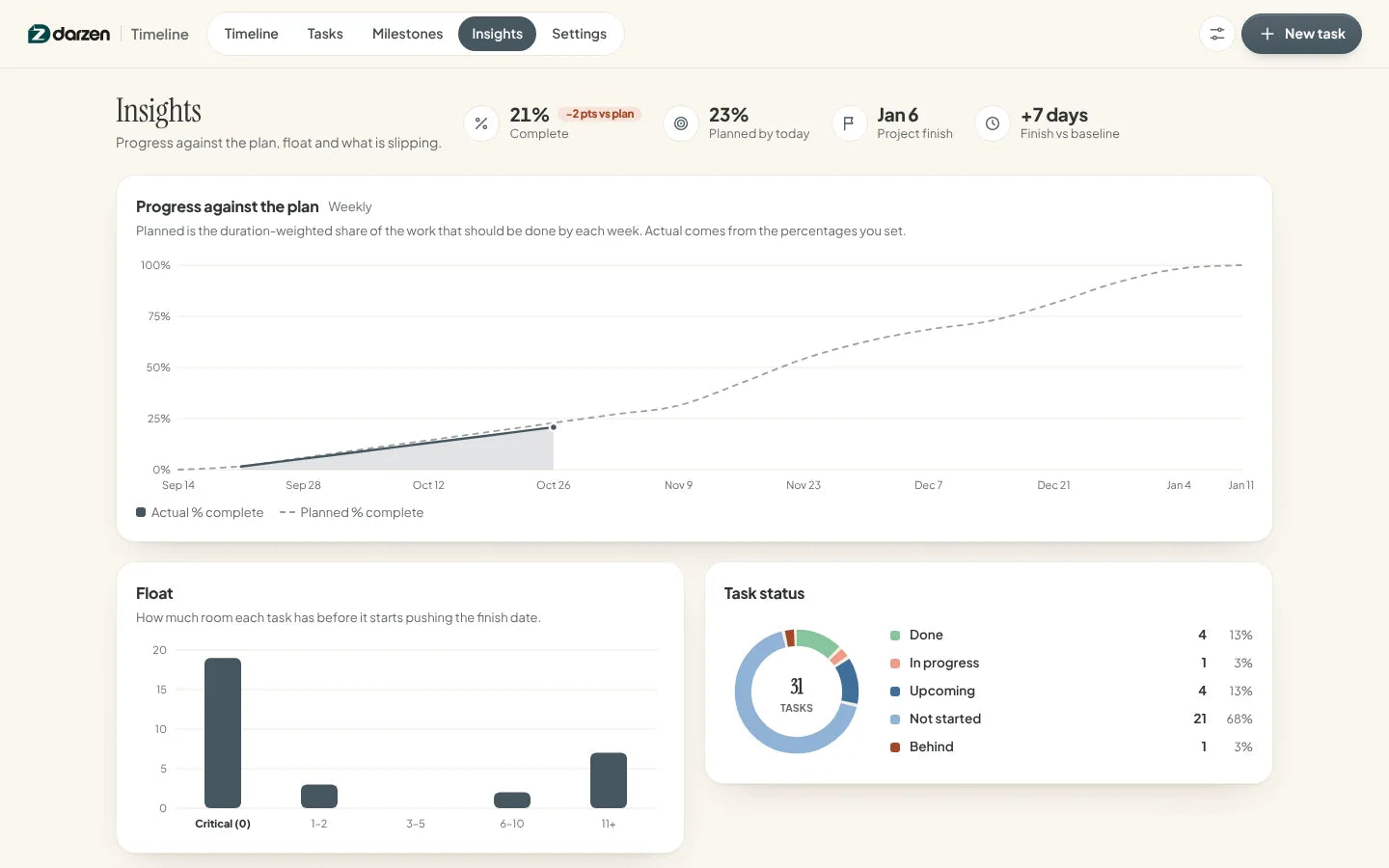
Insights: how the plan is holding up
Planned against actual progress week by week, how float is spread across the tasks, what should have finished and what has slipped against the baseline.
- Planned vs actual curve
- Float distribution
- Behind schedule list
- Slipped against baseline
-
The App5
Settings: the working calendar
Pick the days you work, list holidays and shutdowns, save or clear your baseline, and change the look. Everything is stored on your own device.
- Editable working week
- Named days off
- Save a baseline
- Backup and restore
-
Google Sheets and Excel6
Google Sheets and Excel
The same schedule as a workbook: Dashboard, Schedule, a Gantt drawn week by week, Milestones and a Calendar tab. Type a duration and a predecessor; the dates, the float and the critical path come out of formulas.
- Excel 2010 or later
- No macros
- Example and blank copies
- Prints neatly
Try it first
Click around. Then decide.
Open the real app with a sample shop fit-out and try everything. Nothing you type is saved.
Things to try
- Open a task and add two days to its duration
- Watch the finish date and the baseline chip move
- Switch the zoom from week to day
- Turn Friday off in Settings and see the plan reflow


Google Sheets and Excel share the same tabs and formulas. Shown with the example project; your copy starts blank.
How it works
From checkout to a working schedule in minutes.
-
Check out securely
Pay on Shopify's secure checkout. You see the full price, with any tax, before you pay.
-
Get your login
Your Darzen username and password arrive by email right after payment.
-
Open your editions
Open the App on up to two devices, copy the Google Sheet to your Drive, or download the Excel file.
-
Type your first tasks
Name them, give them durations in working days, say what follows what. The dates appear as you go.
One price
Everything on this page. One payment.
No subscription and no upsells. Updates are free for every buyer.
- The Darzen Timeline App, works offline on two devices
- Google Sheets edition, your own copy in Drive
- Excel edition, blank copy and example copy
- Finish-to-start links, lag and a working calendar
- Total float, the critical path and baseline comparison
- Free updates for every buyer
Secure checkout by Shopify. Your Darzen login is emailed right after payment. Refund policy
Not sure yet? Try the live demo first
A few good answers
Questions, answered.
Delivery, devices, updates and your data. Still curious? We reply to every email.
Ask us a questionHow do I get my files?
Right after checkout we email you a Darzen username and password. Sign in to your Darzen account to download the App and the Excel files, and to make your own copy of the Google Sheets edition.
Which edition should I use?
All three come with every purchase, so you do not have to choose. The App draws the Gantt and works offline, Google Sheets lives in your Google account, and Excel is a file you keep. All three schedule the same way.
Does it do start-to-start links or resource levelling?
No. Links are finish-to-start only, with a lag in working days, and that is stated plainly inside the product too. There is no start-to-start, finish-to-finish or start-to-finish link, no resource levelling, no cost or budget tracking, and no reading or writing of other scheduling tools' files. What it does do is schedule honestly: working-day durations, total float, the critical path and a baseline.
How is the critical path worked out?
A forward pass gives every task its earliest start and finish from its predecessors and the lag. A backward pass gives the latest it can finish without pushing the project out. The difference is total float, and the tasks with zero float are the critical path. The spreadsheet editions do the same thing in formulas, with no macros.
Which version of Excel do I need?
Excel 2010 or later on Windows and Mac, or Excel for the web. The workbook has no macros and no array formulas.
Does the App need the internet?
Only once, to sign in with the login we email you. After that it opens from the file on your device and works offline.
Where is my data kept?
In the browser on your own device, never on our servers. Save a backup file in one click and restore it on any device or browser.
Does it work on my phone?
The App works in your phone's browser, with the Gantt scrolling sideways on its own, and the Google Sheets edition works in the Sheets app. Sign in on up to two devices.
How do updates work?
Updates are free. When a new version is ready, it appears in your Darzen account and the App tells you.
Can I get a refund?
See our refund policy, linked next to the price. Try the live demo first so you know exactly what you are getting.
One app. One Google Sheet. One Excel workbook.


