
Every card and loan. One date to aim for.
Stop guessing how long your debt will take. Darzen Debt Freedom lists every card and loan, builds a payoff plan in the order you choose, and shows the month you could be debt-free and the interest you save by paying a little more. Estimates from your own numbers.
- The App, Google Sheets and Excel in one purchase
- Avalanche, Snowball or your own order, compared side by side
- Extra and one-time payments go to the right debt every month
- One price, free updates, no monthly fee
Login emailed right after checkout · One-time payment · Free updates

The real app with a sample household. Your copy starts empty.
Works on the devices you already use
- The AppAny modern browser, works offline
- Google SheetsFree Google account
- Excel2010 or later, Windows and Mac
- Phone and tabletThe App and Sheets on the go
Every screen. Watch them change hands.
These are the real screens, cycling. Tap any one to hold it.


What's inside
Real screens. No mock-ups.
Every picture is the actual product with a sample household. Tap any screen to see it full size.
Why it works
A plan you can actually follow.
-
Three editions, one price
Use the App on your laptop and phone, keep the Google Sheet in your Drive, or open the Excel file. All three come with every purchase.
-
A date to aim for
See the month you could be debt-free, how many months that is, and how much sooner it comes than paying only the minimums.
-
Your order, your call
Avalanche pays the highest rate first, Snowball the smallest balance. Or drag the debts into your own order, and undo any move.
-
Payments roll forward
When a debt is paid off, its minimum moves to the next one. Your extra and one-time payments, like a tax refund, go to the debt at the top of your order.
-
Due dates in your calendar
Export one calendar file and every due date shows up each month in the calendar you already use, with a reminder two days before.
-
Your numbers stay private
The App keeps your data in your own browser, never on our servers, and never connects to your bank. Back it up in one click and restore it on any device.
Everything in Debt Freedom
One planner. Every debt you carry.
-
The App1
Overview: where you stand today
Your debt-free month, total owed, interest on your plan and how much is paid off so far. The next payment due sits on the right, and the chart shows your plan against paying only the minimums.
- Debt-free month
- Next payment due
- Plan vs minimums chart
- Progress rings
-
The App2
Debts: every card and loan
Each debt shows its balance, rate, minimum, due day, the month it is paid off and the interest left on it. Log a payment or update the balance from the card.
- Payoff order numbers
- Progress bars
- Interest left
- Rate vs balance chart
-
The App3
Plan: choose how you pay it down
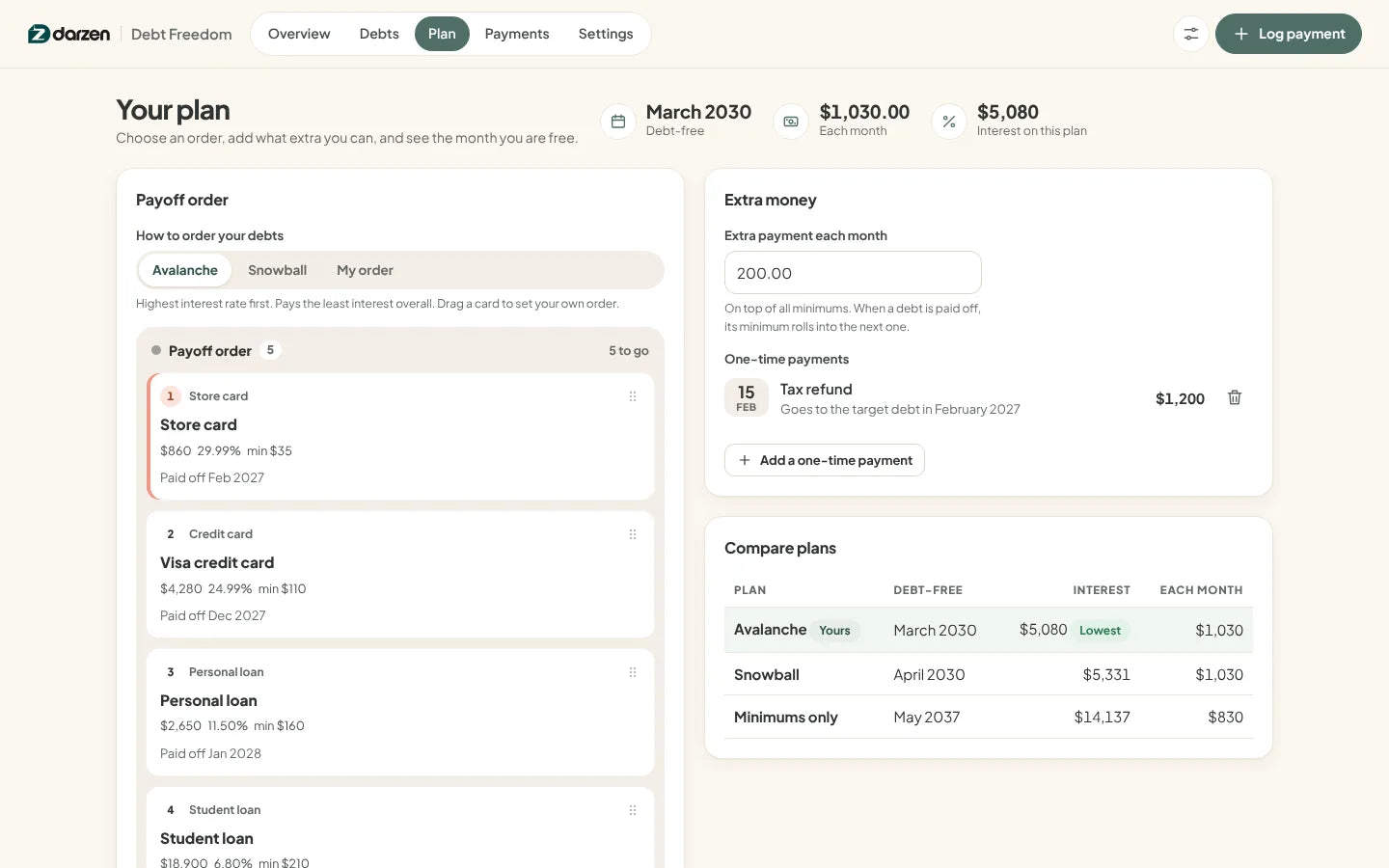
Pick Avalanche, Snowball or your own order, add an extra amount each month and any one-time payments. Compare plans shows the debt-free month and interest for each.
- Avalanche or Snowball
- Drag to reorder
- One-time payments
- Month-by-month schedule
-
The App4
Payments: proof of progress
Every payment you log lowers that balance. See what you paid this month, this year and per month, and the days you made payments.
- Payment log
- Paid per month
- Payment days heatmap
- CSV export
-
The App5
Where each debt stands
Every debt placed by its rate and balance: pay first, high cost, quick wins and slow burn. A quick way to see why the plan picks the order it does.
- Pay first
- Quick wins
- High cost
- Slow burn
-
Google Sheets and Excel6
Google Sheets and Excel
The same planner as a workbook: Dashboard, Debts, Plan, Payments and a month-by-month Schedule. Yellow cells are where you type; everything else updates itself.
- Excel 2010 or later
- No macros
- Example and blank copies
- Prints neatly
Try it first
Click around. Then decide.
Open the real app with a sample household and try everything. Nothing you type is saved.
Things to try
- Switch the plan from Avalanche to Snowball
- Raise the extra payment and watch the date move
- Log a payment on the Store card
- Drag a debt to the top of your order


Google Sheets and Excel share the same tabs and formulas. Shown with the example household; your copy starts blank.
How it works
From checkout to your debt-free month in minutes.
-
Check out securely
Pay on Shopify's secure checkout. You see the full price, with any tax, before you pay.
-
Get your login
Your Darzen username and password arrive by email right after payment.
-
Open your editions
Open the App on up to two devices, copy the Google Sheet to your Drive, or download the Excel file.
-
Add your first debt
Type the balance, rate and minimum from a statement. Your debt-free month appears right away.
One price
Everything on this page. One payment.
No subscription and no upsells. Updates are free for every buyer.
- The Debt Freedom App, works offline on two devices
- Google Sheets edition, your own copy in Drive
- Excel edition, blank copy and example copy
- Avalanche, Snowball or your own payoff order
- Payment log, schedule and due-date calendar file
- Free updates for every buyer
Secure checkout by Shopify. Your Darzen login is emailed right after payment. Refund policy
Not sure yet? Try the live demo first
A few good answers
Questions, answered.
Delivery, devices, updates and your data. Still curious? We reply to every email.
Ask us a questionHow do I get my files?
Right after checkout we email you a Darzen username and password. Sign in to your Darzen account to download the App and the Excel files, and to make your own copy of the Google Sheets edition.
Which edition should I use?
All three come with every purchase, so you do not have to choose. The App feels like software and works offline, Google Sheets lives in your Google account, and Excel is a file you keep.
Which version of Excel do I need?
Excel 2010 or later on Windows and Mac, or Excel for the web. The workbook has no macros.
Does the App need the internet?
Only once, to sign in with the login we email you. After that it opens from the file on your device and works offline.
Where is my data kept?
In the browser on your own device, never on our servers. It never connects to your bank or cards: you type the numbers from your statements. Save a backup file in one click and restore it on any device or browser.
Is this financial advice?
No. It is a planning tool. The debt-free month and the interest figures are estimates worked out from the balances, rates and payments you enter, assuming you pay the same amount every month. Your lender's statement is the final word.
Avalanche or Snowball: which should I pick?
Avalanche pays the highest rate first and usually costs the least interest. Snowball pays the smallest balance first, so your first debts are gone sooner. You can also set your own order. Compare plans shows the debt-free month and interest for each with your own numbers.
Does it work on my phone?
The App works in your phone's browser and the Google Sheets edition works in the Sheets app. Sign in on up to two devices.
How do updates work?
Updates are free. When a new version is ready, it appears in your Darzen account and the App tells you.
Can I get a refund?
See our refund policy, linked next to the price. Try the live demo first so you know exactly what you are getting.
One app. One Google Sheet. One Excel workbook.


