
A cleaning schedule that reshuffles itself.
Most cleaning charts break the first week you skip. This one works out what is due from when each task was last done, so a missed day just moves the rotation along. Nothing sits there as a failure, and there is a low-energy mode for the days when the full list is too much.
- What is due today, worked out from your own dates
- Low-energy mode trims today to the few easiest jobs that matter
- Share the work, with a rotation and a 30-day fair-share view
- The App, Google Sheets and Excel in one purchase
Login emailed right after checkout · One-time payment · Free updates
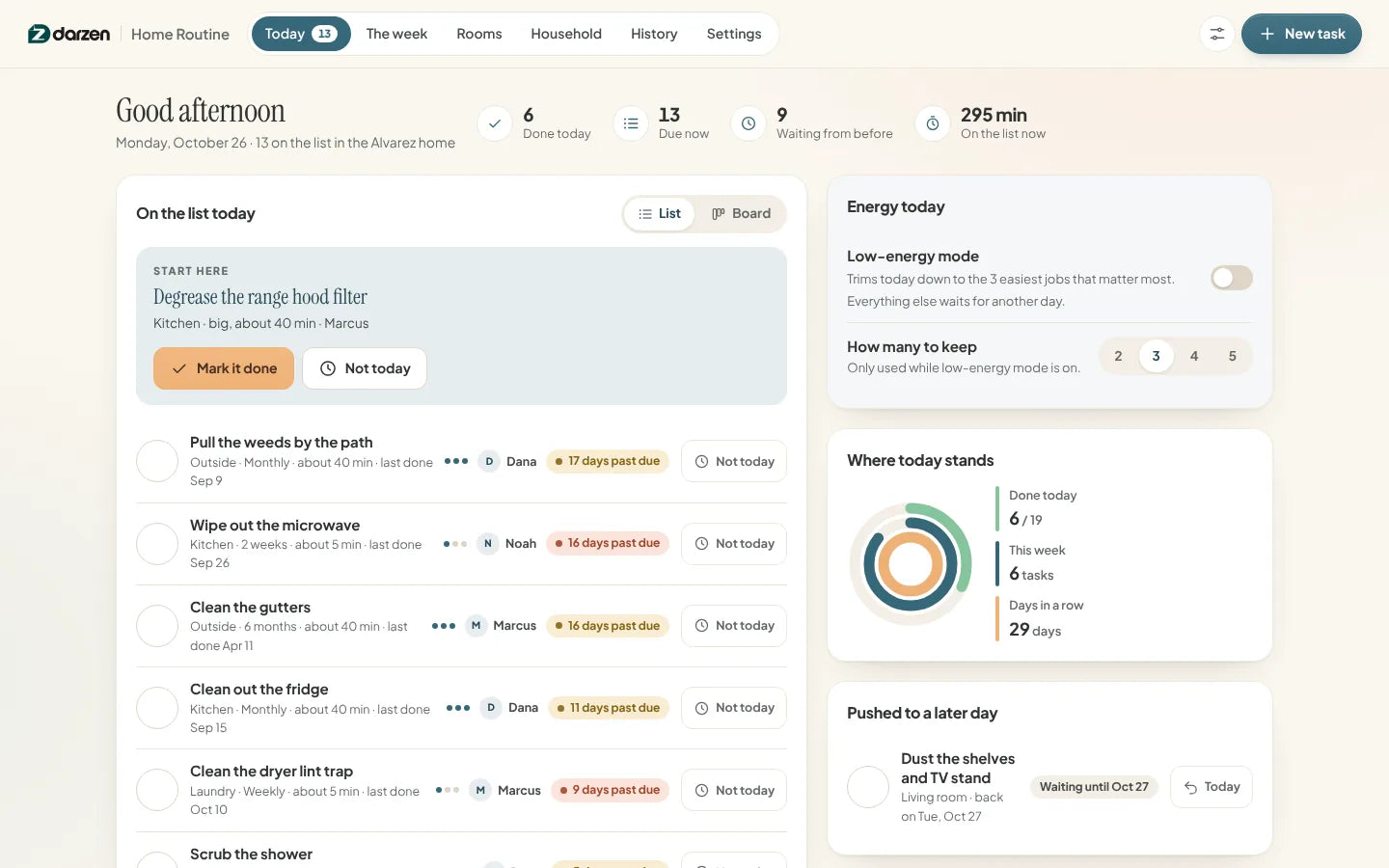
The real app with one made-up household. Your copy starts empty.
Works on the devices you already use
- The AppAny modern browser, works offline
- Google SheetsFree Google account
- Excel2010 or later, Windows and Mac
- Phone and tabletThe App and Sheets on the go
Every screen. Watch them change hands.
These are the real screens, cycling. Tap any one to hold it.


What's inside
Real screens. No mock-ups.
Every picture is the actual product with one made-up household. Tap any screen to see it full size.
Why it works
Built for a real week, gaps and all.
-
A rotation, not a fixed chart
Every task carries how often it comes round. Next due is simply the day it was last done plus that number of days, so skipping a day reshuffles the list instead of leaving broken checkboxes behind.
-
A low-energy day is still a day
One switch trims today to the few lowest-effort jobs that matter most. Everything else moves to "waiting for another day" — not late, not failed, and it all comes straight back when you turn the switch off.
-
Nothing is scored against you
A quiet day is just a quiet day. Nothing turns red for a missed personal task, no run is punished, and a task nobody has ever done shows as due today with no backlog behind it.
-
Three editions, one price
Use the App on your laptop and phone, keep the Google Sheet in your Drive, or open the Excel file. All three come with every purchase.
-
Share it out, fairly
Assign tasks to the people in your home and let a task pass to the next person each time it is done. A 30-day view shows who has actually been doing the work.
-
Your home stays your business
The App keeps everything in your own browser, never on our servers. Back it up in one click and restore it on any device.
Everything in Home Routine
One routine. Every room, every week.
-
The App1
Today: what is actually due
Open it and see what the house is asking for right now, with one task picked out to start with. Tick things off, or push one to a day that suits you better.
- Worked out from your dates
- Low-energy mode
- Push to another day
- List or board
-
The App2
The Week: the seven days ahead
Each day fills itself in from when things were last done. Anything already waiting sits on today, never on a day that has gone. Search, filter and edit every task from the list below.
- Seven days ahead
- Search and filters
- Export CSV
- Calendar file
-
The App3
Rooms: including the one you have let go
Each room shows what it needs and when it was last looked after. Let one slide for a month? Reset it and every task in it starts its own clock again from today — nothing marked as missed.
- A card per room
- Reset a room
- Which room needs a session
- On track by room
-
The App4
Household: who is doing what
Assign tasks to the people in your home, or let a task pass to the next person each time it is done. The 30-day view shows the real split, in tasks and in rough time.
- Rotation between people
- 30-day fair share
- Week by week, per person
- Rough time estimates
-
The App5
History: encouraging, never scolding
A heat calendar of the days something got done, your current run and your best so far, what you finished each week and which tasks have waited longest. No target and no score.
- Heat calendar
- Current and best run
- Week by week
- Waiting longest
-
Google Sheets and Excel6
Google Sheets and Excel
The same routine as a workbook: Today, The Week, Tasks, Rooms, People, History and a done log. Type the day a task was last done; the next due date, the days past due and the Today list all work themselves out.
- Excel 2010 or later
- No macros
- Example and blank copies
- Prints neatly
Try it first
Click around. Then decide.
Open the real app with one made-up household and try everything. Nothing you type is saved.
Things to try
- Turn on low-energy mode on Today and watch the list shrink
- Push a task to tomorrow, then bring it back
- Reset a room and see every task start again
- Check the 30-day split on Household


Google Sheets and Excel share the same tabs and formulas. Shown with the example household; your copy starts blank.
How it works
From checkout to your first clean list in minutes.
-
Check out securely
Pay on Shopify's secure checkout. You see the full price, with any tax, before you pay.
-
Get your login
Your Darzen username and password arrive by email right after payment.
-
Open your editions
Open the App on up to two devices, copy the Google Sheet to your Drive, or download the Excel file.
-
Put your rooms in
Start from the included task library, keep what fits your home and delete the rest.
One price
Everything on this page. One payment.
No subscription and no upsells. Updates are free for every buyer.
- The Home Routine App, works offline on two devices
- Google Sheets edition, your own copy in Drive
- Excel edition, blank copy and example copy
- A starting library of household tasks by room and frequency
- Low-energy mode, rooms, people and a 30-day fair share
- Free updates for every buyer
Secure checkout by Shopify. Your Darzen login is emailed right after payment. Refund policy
Not sure yet? Try the live demo first
A few good answers
Questions, answered.
Delivery, devices, updates and your data. Still curious? We reply to every email.
Ask us a questionHow do I get my files?
Right after checkout we email you a Darzen username and password. Sign in to your Darzen account to download the App and the Excel files, and to make your own copy of the Google Sheets edition.
Which edition should I use?
All three come with every purchase, so you do not have to choose. The App feels like software and works offline, Google Sheets lives in your Google account, and Excel is a file you keep.
What happens if I skip a few days?
The list reshuffles. Next due is the day a task was last done plus how often it comes round, so nothing stays overdue forever and there is no backlog to catch up on. Days past due are counted and shown plainly, and a task nobody has ever done simply shows as due today.
Does the spreadsheet do everything the App does?
Close to it. Today, The Week, Tasks, Rooms, People and History are all there, and low-energy mode is a Yes or No cell in Settings that trims the Today list the same way. Two things are App-only: ticking a task off in one tap, and a task on rotation moving to the next person by itself. In the workbook you type the date and the name yourself.
Which version of Excel do I need?
Excel 2010 or later on Windows and Mac, or Excel for the web. The workbook has no macros.
Does the App need the internet?
Only once, to sign in with the login we email you. After that it opens from the file on your device and works offline.
Where is my data kept?
In the browser on your own device, never on our servers. Save a backup file in one click and restore it on any device or browser.
Does it work on my phone?
The App works in your phone's browser and the Google Sheets edition works in the Sheets app. Sign in on up to two devices.
How do updates work?
Updates are free. When a new version is ready, it appears in your Darzen account and the App tells you.
Can I get a refund?
See our refund policy, linked next to the price. Try the live demo first so you know exactly what you are getting.
One app. One Google Sheet. One Excel workbook.


