
Everything your family would need. On your device, not ours.
If someone had to take over tomorrow, could they find the insurer, the attorney, the deed and the person who takes the dog? Darzen Life Binder puts all of it in nine sections, shows you what is still missing, and prints a one-page sheet for the first hour. Nothing leaves your device, and you can lock it behind a passphrase.
- Stays on your device. No account, no cloud, no sync
- Optional passphrase lock with real encryption (AES-GCM)
- No field for a password, a PIN or an account number, ever
- The App, Google Sheets and Excel in one purchase
Login emailed right after checkout · One-time payment · Free updates
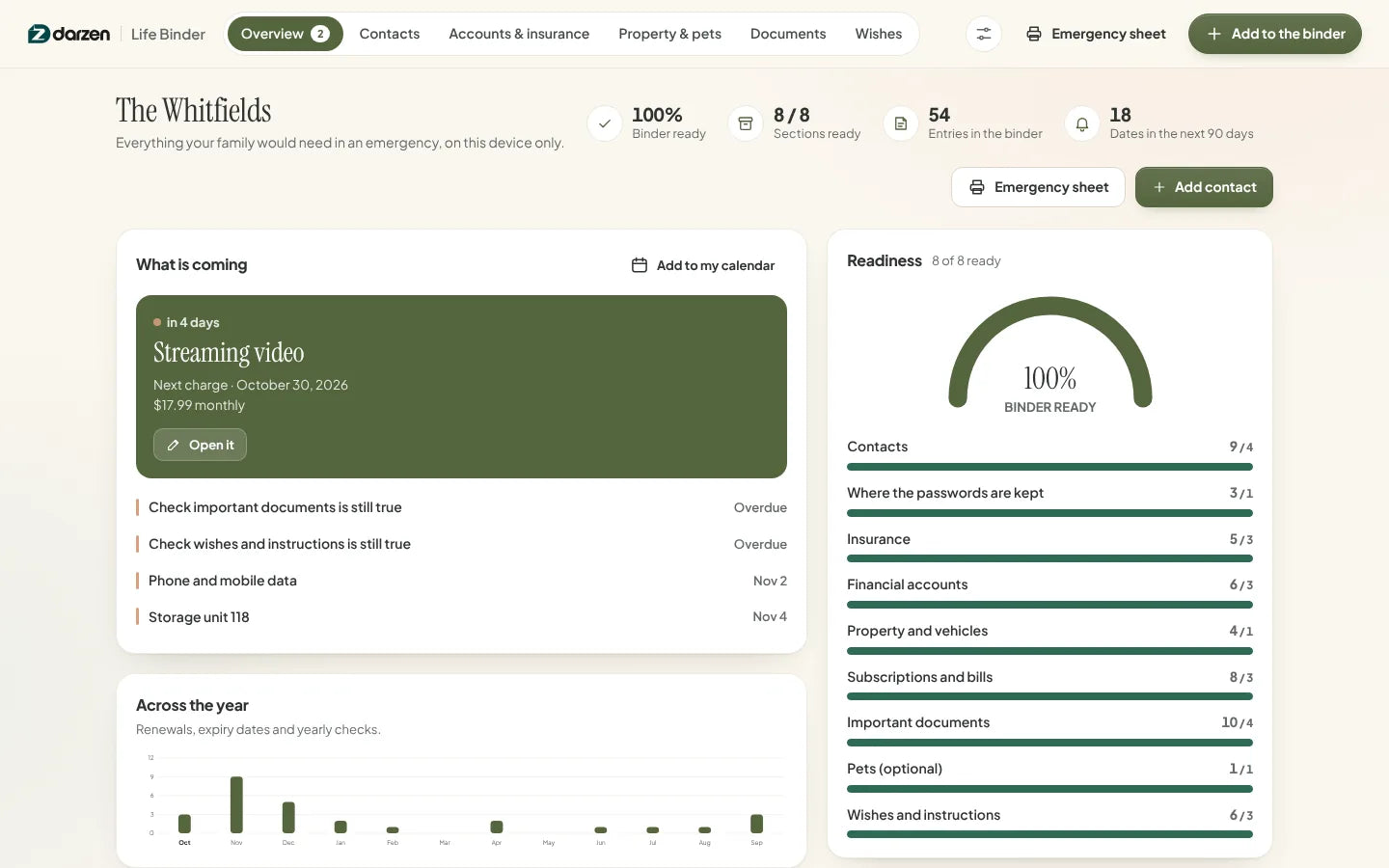
The real app with an invented family. Your copy starts empty.
Works on the devices you already use
- The AppAny modern browser, works offline
- Google SheetsFree Google account
- Excel2010 or later, Windows and Mac
- Phone and tabletThe App and Sheets on the go
Every screen. Watch them change hands.
These are the real screens, cycling. Tap any one to hold it.


What's inside
Real screens. No mock-ups.
Every picture is the actual product with an invented family in it. Tap any screen to see it full size.
Why it works
Built for the week nobody plans for.
-
It stays on your device
There is no account to make and nothing to sign in to. The App keeps the binder in your own browser storage, on the device you opened it on. Nothing is uploaded, synced or sent anywhere, and we never see it.
-
A passphrase lock that is real
Turn the lock on and the binder saved on your device, and any backup you download, is encrypted with AES-GCM. The key is worked out from your passphrase with PBKDF2-SHA256 over a random salt. There is no recovery: no reset link, no backup key, and nobody at Darzen can open it. If the passphrase is lost, the binder is gone. We would rather tell you that now than pretend otherwise.
-
It refuses to be a password store
There is no field for a password, a PIN, a security answer or an account number, in the App or in either spreadsheet. It records where the passwords are kept and who can reach them, so nothing in the file can be used to move money.
-
It tells you what is still missing
Nine sections, each with a target. A readiness number and a list of the gaps, so you can fill it in over a few evenings instead of staring at an empty page.
-
Renewals, expiry dates and a yearly check
Policies, registrations, passports and next charges all show up under What is coming. Export one calendar file and they land in the calendar you already use, along with the yearly "is this still true?" check for every section.
-
Three editions, one price
Use the App on your laptop and phone, keep the Google Sheet in your own Drive, or open the Excel file. All three come with every purchase, and updates are free.
Everything in Life Binder
Nine sections. One page for the first hour.
-
The App1
Overview: what is done, what is not
A readiness number built from nine sections, a bar for each one, and a plain list of what is still thin. Next to it, the renewals, expiry dates and checks coming up, and a chart of the year ahead.
- Readiness by section
- What is still missing
- Dates coming up
- Calendar file
-
The App2
The first hour, on one page
Who to call and in what order, the doctor and the pharmacy, where the passwords are kept and who can reach them, the insurers to tell, and where the will and the deed are. Print it and leave it where it would be found.
- Prints on one page
- Call order you choose
- No numbers on it
- Updates itself
-
The App3
Contacts: who to call first
Four groups: call first, the household, medical, and the people like the attorney and the accountant. Medical entries are contacts and where the records are kept, nothing more.
- Call order
- Household and school
- Doctor, dentist, pharmacy
- Attorney and accountant
-
The App4
Accounts, insurance and the bills
The institution, what each account is for, and who can already reach it. Policies with renewal dates and the agent's number. The bills that would keep running, with what should happen to each one.
- Who can already reach it
- Renewal dates
- Where the passwords are
- Bills to cancel
-
The App5
Documents: where the originals are
The will, the trust, the power of attorney, the directive, the deed, the passports. Where the original is, where a copy is, who else has one, and what needs renewing.
- Where the original is
- Who has a copy
- Expiry dates
- Kept in how many places
-
Google Sheets and Excel6
Google Sheets and Excel
The same binder as a workbook: Dashboard, the nine sections, Settings and a print-ready Emergency Sheet. Yellow cells are where you type; everything else updates itself. The spreadsheet editions cannot lock themselves, so keep them somewhere you control.
- Excel 2010 or later
- No macros
- Example and blank copies
- Emergency sheet on one page
Try it first
Click around. Then decide.
Open the real app with an invented family in it and try everything. Nothing you type is saved.
Things to try
- Open the emergency sheet and read the first hour
- Set a passphrase and see exactly what it does and does not do
- Add a contact and give them a call order
- Mark a section checked today and watch the overview change


Google Sheets and Excel share the same tabs and formulas. Shown with the example family; your copy starts blank.
How it works
From checkout to a printed emergency sheet in an evening.
-
Check out securely
Pay on Shopify's secure checkout. You see the full price, with any tax, before you pay.
-
Get your login
Your Darzen username and password arrive by email right after payment.
-
Open your editions
Open the App on up to two devices, copy the Google Sheet to your Drive, or download the Excel file.
-
Start with the three people
Add the three people who should be called first, then print the one-page sheet. The rest can take a few evenings.
One price
Everything on this page. One payment.
No subscription and no upsells. Updates are free for every buyer.
- The Life Binder App, works offline on two devices
- Optional passphrase lock with AES-GCM encryption
- Google Sheets edition, your own copy in Drive
- Excel edition, blank copy and example copy
- Nine sections, readiness view and renewal dates
- A one-page emergency sheet you can print
- Free updates for every buyer
Secure checkout by Shopify. Your Darzen login is emailed right after payment. Refund policy
Not sure yet? Try the live demo first
A few good answers
Questions, answered.
Delivery, devices, updates and your data. Still curious? We reply to every email.
Ask us a questionHow do I get my files?
Right after checkout we email you a Darzen username and password. Sign in to your Darzen account to download the App and the Excel files, and to make your own copy of the Google Sheets edition.
What happens if I forget the passphrase?
The binder is gone. The passphrase is never stored, on your device or with us, and the key to the encryption is worked out from it, so there is no reset link, no backup key and no way for us to open it. That is the whole point of the lock. If you turn it on, write the passphrase down somewhere other than the binder, or tell the person who would need to open it. The lock is optional; with it off, the App works exactly the same.
Does it replace a will?
No. It is not a will, a trust, a power of attorney or any other legal document, and it does not replace one. It is a place to record where those documents are kept, who else has a copy, and what you want people to know. Nothing in it is legal or estate advice. For the documents themselves, see an attorney in your state.
Which edition should I use?
All three come with every purchase, so you do not have to choose. The App feels like software, works offline and is the only edition with the passphrase lock. Google Sheets lives in your Google account, and Excel is a file you keep.
Which version of Excel do I need?
Excel 2010 or later on Windows and Mac, or Excel for the web. The workbook has no macros.
Does the App need the internet?
Only once, to sign in with the login we email you. After that it opens from the file on your device and works offline.
Where is my data kept, and can it hold my passwords?
Your binder stays in the browser on your own device, never on our servers. There is no account and no sync. Save a backup file in one click and restore it on any device or browser; with the lock on, that backup is encrypted too. It will not hold passwords: there is no field for a password, a PIN, a security answer or an account number anywhere in the App or either spreadsheet, on purpose. You record where the passwords are kept and who can reach them, so nothing in the file can be used to move money.
Does it work on my phone?
The App works in your phone's browser and the Google Sheets edition works in the Sheets app. Sign in on up to two devices.
How do updates work?
Updates are free. When a new version is ready, it appears in your Darzen account and the App tells you.
Can I get a refund?
See our refund policy, linked next to the price. Try the live demo first so you know exactly what you are getting.
One app. One Google Sheet. One Excel workbook.


